

Deploying Sourcegraph executors using Docker Compose
This feature is in beta and might change in the future.
A docker-compose file is provided to deploy executors standalone, or alongside your existing Sourcegraph deployment.
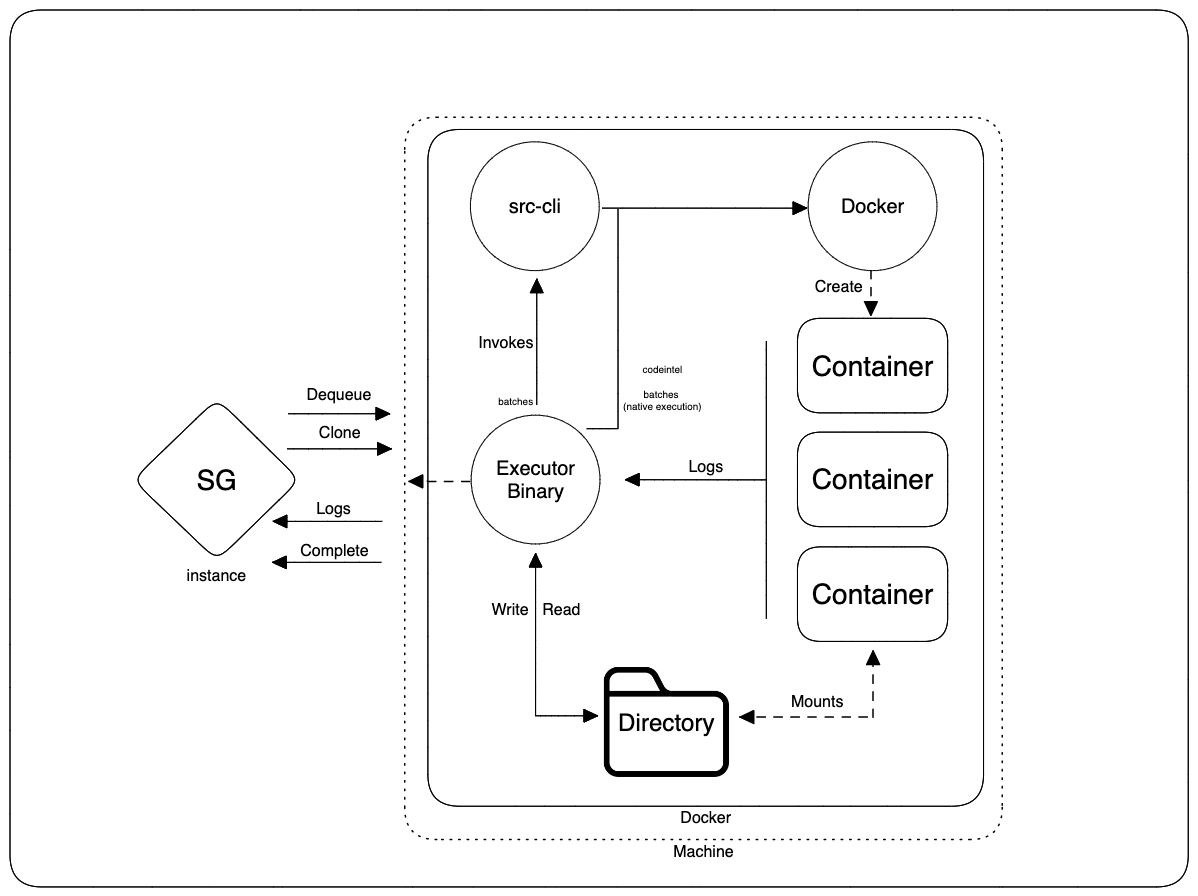
How it works
The executor service itself runs in a Docker container and polls Sourcegraph for work. After dequeuing a job, it clones the target repository into a workspace and uses the Docker daemon to run each job step sequentially in another container. Batch Changes jobs that do not use native execution invoke src; code navigation and native Batch Changes jobs invoke Docker directly. Logs and the final job status are streamed back to Sourcegraph.
On this page
Requirements
Privileged containers are required to run executors in docker-compose. This is because executors require access to the docker daemon running on the host.
Deployment
Prerequisites
- Install Docker Compose on the server
- Minimum Docker v20.10.0 and Docker Compose v1.29.0
- Docker Swarm mode is not supported
- Clone the deploy-sourcegraph-docker
- Edit the
deploy-sourcegraph-docker/docker-compose/executors/executor.docker-compose.yamland update the environment variables - Follow the instructions in the
READMEfor more specific deployment instructions.
Upgrading executors
Upgrading Docker Compose executors requires updating the executor image tag in the compose file and recreating the container. Check the changelog for any executor-related breaking changes or new features.
-
Navigate to the
deploy-sourcegraph-dockerrepository and pull the latest changes for the target version:BASHcd deploy-sourcegraph-docker git fetch git checkout v<target version>If you are using a custom compose file rather than the one from the repository, update the
imagefield for theexecutorservice to the target version. For example, to upgrade to version 7.5.0:YAMLservices: executor: image: 'index.docker.io/sourcegraph/executor:7.5.0' -
Recreate the executor container with the updated image:
BASHcd docker-compose
docker compose -f docker-compose.yaml -f executors/executor.docker-compose.yaml up -d executor
If you are running executors on a standalone machine:
BASHdocker compose -f executor.docker-compose.yaml up -dDocker Compose will pull the new image and recreate the executor container. The executor will briefly disconnect during the restart.
-
Verify the new container is running with the expected image:
BASHdocker ps --filter name=executor --format 'table {{.Names}}\t{{.Image}}\t{{.Status}}' -
Confirm the executor is online and reporting the expected version under Site admin > Executors > Instances.
Related configuration
Note
Executors deployed via Docker Compose do not use Firecracker, meaning they require privileged access to the Docker daemon running on the host.
If you have security concerns, consider deploying via terraform or installing the binary directly.